
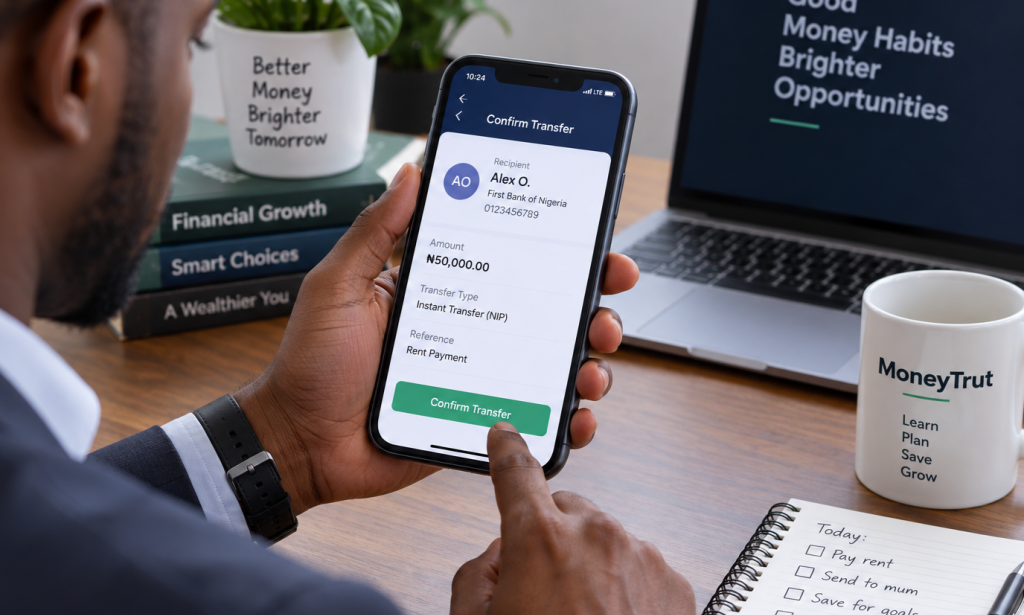
Sending money from one Nigerian bank account to another can take only a few seconds.
You open your banking app.
Enter the recipient's account number.
Confirm the name.
Enter the amount.
Authorize the transaction.
Then you see:
Transfer successful.
For most people, that is where the story ends.
But what actually happens between pressing "send" and the recipient receiving the money?
And why does a transfer sometimes show as successful on one side but the recipient does not receive it immediately?
What happens when your account is debited but the recipient's account is not credited?
Understanding these basics can make it much easier to know what to do when a transfer problem occurs.
What Is a Bank Transfer?
A bank transfer is the electronic movement of money from one bank account to another.
The two accounts may belong to:
- The same bank
- Different banks
- An individual
- A business
- A government organisation
- Another financial institution participating in the relevant payment system
For example, if you send ₦50,000 from your Access Bank account to someone's GTBank account, the money has to move between two separate banking institutions.
That requires a payment system to facilitate the transaction.
In Nigeria, electronic payments can be made through different channels, including internet banking, mobile banking applications, USSD and other electronic payment channels.
The method you use to initiate the transfer is not necessarily the same thing as the underlying payment infrastructure that processes it.
That distinction is important.
How a Bank Transfer Actually Works

Suppose you want to send ₦100,000 to another person's account.
The process can be simplified into several stages.
Step 1: You Initiate the Transfer
You use:
- Mobile banking
- Internet banking
- USSD
- A bank branch
- Another authorised payment channel
You enter the recipient's details and amount.
Step 2: Your Bank Checks the Transaction
Your bank may check things such as:
- Whether you have sufficient funds
- Whether the account is active
- Whether the transaction meets applicable limits
- Whether the transaction requires additional authentication
- Whether there are security concerns
Step 3: The Payment Is Sent Through the Appropriate Infrastructure
If the recipient uses another bank, the transaction has to be routed through the relevant interbank payment infrastructure.
For instant payments, Nigeria's electronic payment environment supports transactions between participating financial institutions.
Step 4: The Recipient's Bank Receives the Transaction
The receiving institution processes the payment and, where everything is in order, credits the beneficiary's account.
Step 5: Both Sides Receive Transaction Information
Your bank records the transaction.
The recipient's bank records the incoming payment.
This is why both parties can normally see evidence of the transaction in their account history.
The process is much more complicated behind the scenes, but this is the basic idea.
What Is NIP?
You may have seen the term NIP when making a bank transfer in Nigeria.
NIP stands for Nigeria Inter-Bank Settlement System Instant Payment.
It is an electronic payment system used for instant interbank transfers in Nigeria.
The important point is that NIP is not the same thing as your bank's mobile app.
Your mobile banking app is a channel through which you initiate a transaction.
NIP is part of the payment infrastructure through which an interbank payment can be processed.
This is why you can use your bank's app to send money to another bank while the underlying transaction may be processed through an interbank payment system.
Mobile Banking and Bank Transfers Are Not the Same Thing
This distinction often causes confusion.
When someone says:
"I transferred money through mobile banking."
They are describing the channel they used.
Mobile banking allows you to access banking services through your phone.
You can use it to:
- Transfer money
- Check balances
- Pay bills
- Buy airtime
- Manage beneficiaries
- View transactions
- Perform other banking activities supported by your bank
The transfer itself is the movement of money.
The mobile app is simply one way of instructing the bank to make that movement.
What About USSD Transfers?
USSD allows customers to access certain banking services through codes entered on a mobile phone.
You do not necessarily need a smartphone or mobile data connection to use USSD banking, although the service depends on your bank and telecommunications network.
For example, a bank may provide a USSD code that allows customers to:
- Check balances
- Transfer money
- Buy airtime
- Pay bills
- Perform other supported transactions
The exact code, limits and services depend on the bank.
USSD is therefore another access channel.
It does not mean that the underlying banking transaction is fundamentally different simply because you entered a code instead of using an app.
What Is the Difference Between Same-Bank and Interbank Transfers?
This is easier to understand with an example.
Same-bank transfer
You send:
₦100,000 from Bank A to another Bank A account.
Both accounts are held within the same institution.
The bank does not need to send the payment to another bank.
Interbank transfer
You send:
₦100,000 from Bank A to Bank B.
The payment has to move between separate institutions.
This requires interbank payment infrastructure.
From the customer's perspective, both may look almost identical.
You enter an account number, confirm the recipient and send the money.
Behind the scenes, however, the processing path can be different.
Why Does the App Ask You to Confirm the Account Name?
When you enter an account number and select a bank, your banking platform will often retrieve a beneficiary name before you complete the transfer.
This helps you check that the account details correspond to the intended recipient.
It is an important safety step.
For example, suppose you want to send ₦200,000 to:
John Okoro
But the name displayed is:
Peter Adewale
That is a reason to stop and verify the account number.
Do not assume that the name mismatch is harmless.
A transfer to the wrong account can become much more difficult to recover after the money has been credited.
What Happens When You Send Money to the Wrong Account?
This is one of the most stressful bank-transfer situations.
Suppose you intend to send:
₦80,000
to one person but accidentally enter another person's account number.
If the transaction is processed successfully, the money may be credited to the unintended beneficiary.
The first thing to do is contact your bank promptly.
Provide:
- Transaction reference
- Date and time
- Amount
- Your account details
- Beneficiary account details
- Evidence of the transaction
Your bank can advise you on the recovery process.
Do not wait several weeks before reporting the problem.
And never assume that because the transfer was a mistake, the bank can simply remove the money from the recipient's account without following the applicable process.
What Does "Successful" Mean?
When your banking app says a transfer was successful, it generally means the transaction has been processed successfully according to the status reported by the relevant payment system or bank.
But there is an important distinction between:
Successful transaction
and
The recipient confirming that they can see the money.
For a normal completed transfer, the recipient should receive the funds.
But technical issues can occasionally create situations where transaction records or account balances do not appear to update simultaneously.
This is why transaction references and bank records matter.
What Does "Pending" Mean?
A pending transaction generally means the transaction has not yet reached a final status.
This can happen for different reasons.
For example:
- Network problems
- Temporary system issues
- Processing delays
- Security checks
- Communication problems between systems
- Payment-system interruptions
A pending transaction does not necessarily mean the money is permanently lost.
The appropriate response depends on the transaction status and your bank's instructions.
Avoid immediately sending the same amount again without checking what happened.
Otherwise, you could accidentally send the money twice.
What Does "Failed" Mean?
A failed transfer means the transaction did not complete successfully.
You might see messages such as:
Transaction failed
Unable to process
Transfer unsuccessful
or another bank-specific error message.
If your account was not debited, the situation is usually straightforward: the transfer did not go through and you can investigate the reason before trying again.
But things become more complicated when your account was debited even though the transfer is showing as failed.
What If Your Account Is Debited but the Recipient Doesn't Receive the Money?
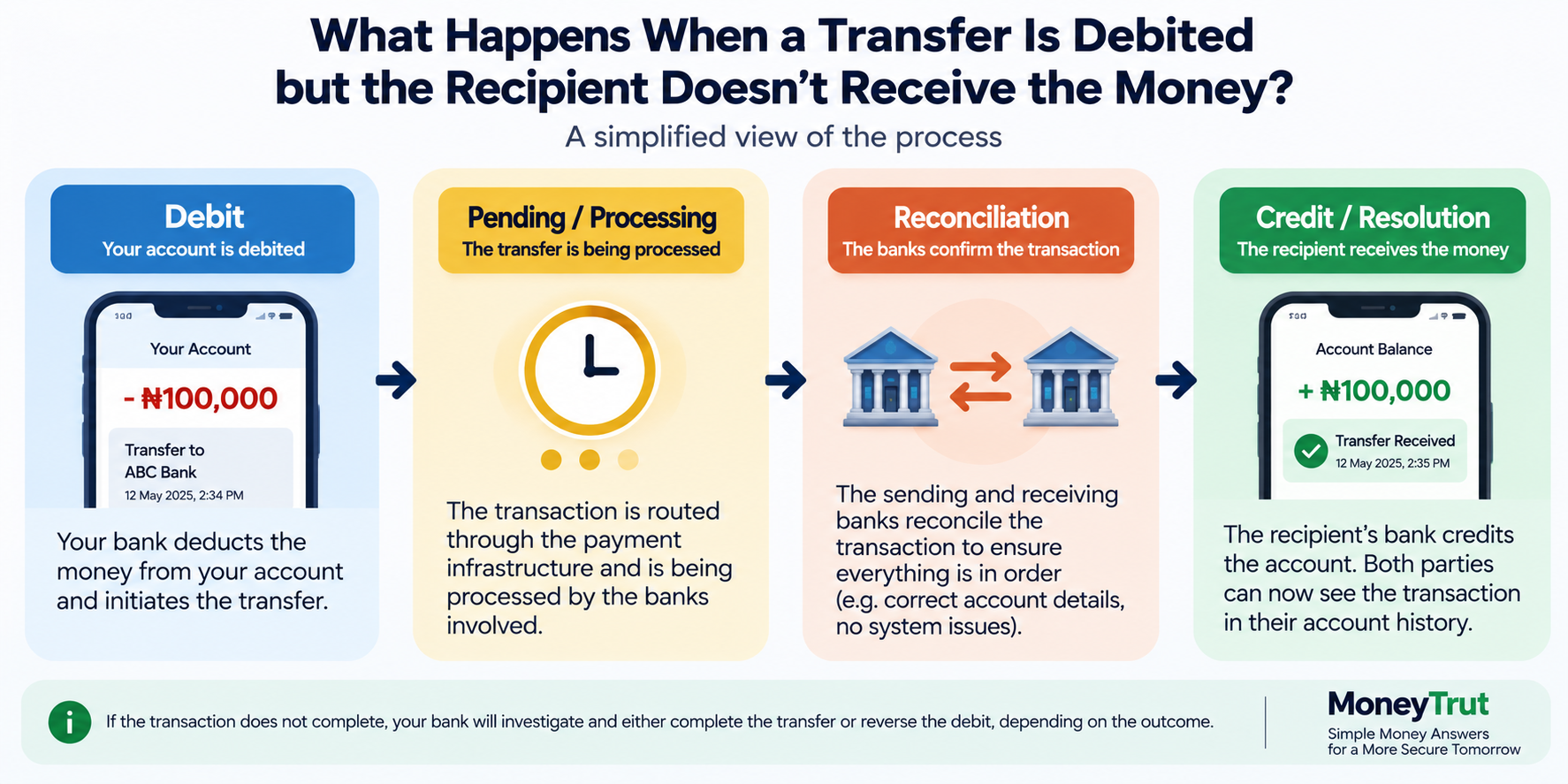
This is one of the most common questions people have about electronic transfers.
Imagine:
You send ₦100,000.
Your account balance decreases by ₦100,000.
But the recipient says:
"I haven't received anything."
Don't immediately assume the money has disappeared.
There can be a delay in the transaction being fully reconciled.
First, check:
- Your transaction history
- The transaction status
- The transaction reference
- Whether the recipient's account details were correct
- Whether the recipient's bank is experiencing an issue
Then contact your bank if the situation is not resolved.
Give the bank the transaction reference rather than simply saying:
"I sent money and they didn't receive it."
The reference allows the bank to trace the transaction more efficiently.
Don't Send the Money Again Immediately
Suppose you send ₦200,000.
Your account is debited.
The recipient says they haven't received it.
You become impatient and send another ₦200,000.
Now the recipient receives both transactions.
You have potentially sent:
₦400,000
instead of:
₦200,000
This is why you should establish the status of a problematic transfer before repeating it.
If the first transaction eventually succeeds, you may have to recover the duplicate payment separately.
Keep Your Transaction Reference
A transaction reference is one of the most useful pieces of information when dealing with a transfer problem.
Depending on the bank or payment channel, it may appear as:
- Transaction reference
- Session ID
- Transaction ID
- Payment reference
- Retrieval reference
- Another bank-specific identifier
Save it.
If you contact customer service, provide it immediately.
This is much more useful than giving only the amount.
For example:
"I transferred ₦150,000 at 2:34 p.m. and the recipient has not received it. The transaction reference is ABC123456."
That gives the bank something specific to investigate.
How Long Does a Failed or Pending Transfer Take to Resolve?
There is no single time that applies to every transaction.
The resolution can depend on:
- The bank
- The payment channel
- The transaction status
- Whether another bank is involved
- Whether the transaction requires reconciliation
- Whether there is a technical problem
Some transactions may resolve quickly.
Others may require the bank to investigate and reconcile the transaction.
If a significant amount is involved, don't simply wait indefinitely.
Contact your bank and obtain a complaint or service reference where appropriate.
What Should You Do When a Transfer Problem Happens?
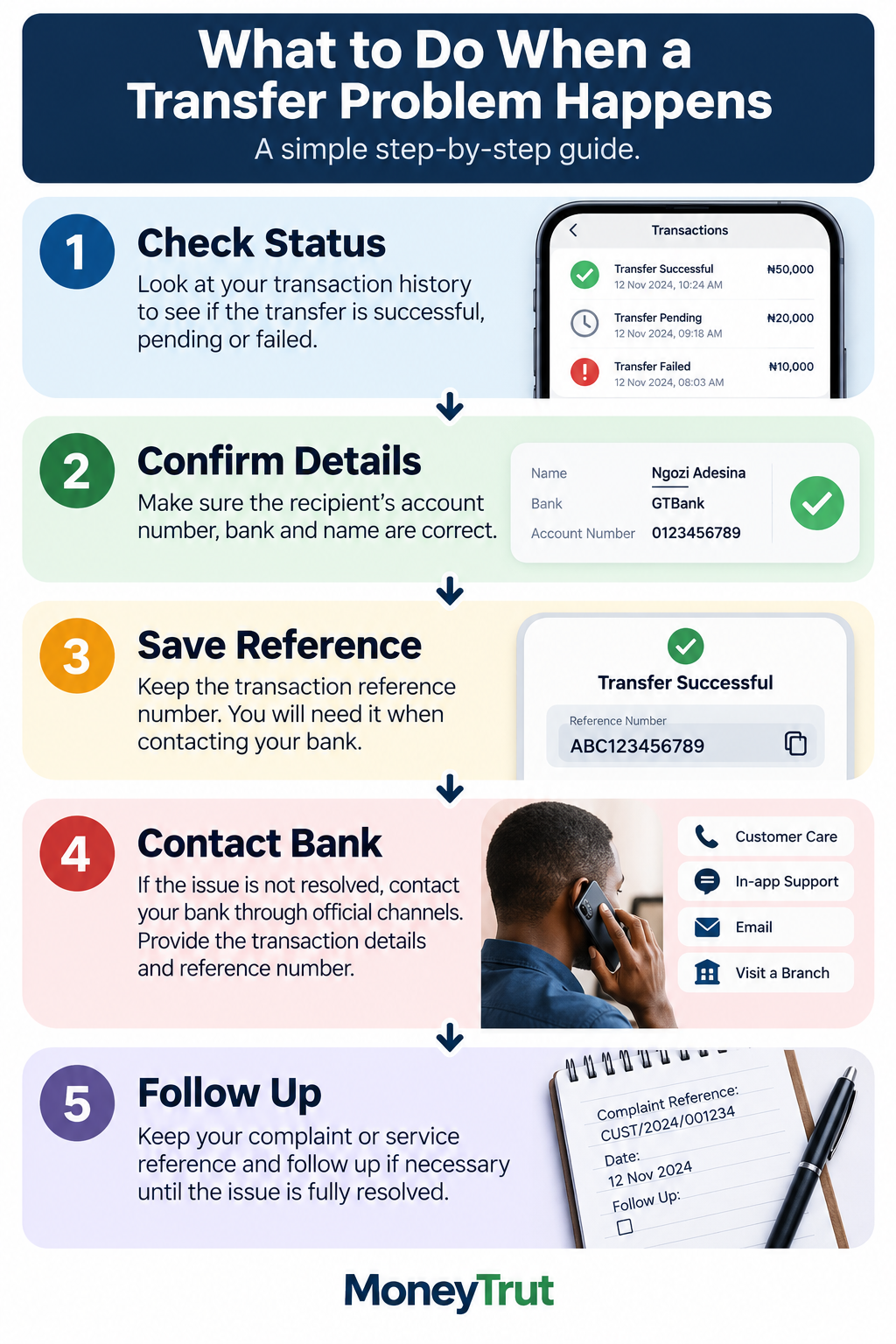
Use this simple process.
1. Don't panic
A debit does not automatically mean the money is permanently lost.
2. Check the transaction status
Look at your transaction history.
3. Confirm the recipient's details
Make sure the account number and bank were correct.
4. Get the transaction reference
Keep the reference number.
5. Ask the recipient to check properly
The recipient should check the actual account balance and transaction history rather than relying only on an SMS or notification.
6. Contact your bank
Explain the problem and provide the transaction details.
7. Record your complaint reference
If customer service creates a complaint or dispute ticket, keep the reference.
8. Follow up if necessary
Don't repeatedly initiate new transfers simply because the first one appears delayed.
What If You Receive Money You Were Not Expecting?
Suppose ₦300,000 suddenly enters your account.
You don't recognise the sender.
Do not immediately spend it.
Contact your bank and report the unexpected credit.
An accidental transfer can happen.
If someone contacts you claiming that you received their money, don't simply send it to another account they provide without verifying the situation through your bank.
This is particularly important because scammers can use social engineering to pressure people into making transfers.
Be Careful With "Send It Back to This Account"
Imagine someone sends you a message:
"I mistakenly transferred ₦100,000 to you. Please send it back to this other account."
Don't act purely on the message.
Verify the credit with your bank.
The safest approach is to let the bank guide the resolution, particularly if the person asking you to return the money provides different account details.
Bank Transfer Fraud Is Different From a Normal Transfer Error
Not every transfer problem is a technical issue.
Sometimes the customer has been deceived into authorising the transfer.
For example:
Someone contacts you pretending to be:
- Your bank
- A relative
- A business
- A government agency
- A delivery company
- A customer
- A friend
They convince you to send money.
From the bank's perspective, the transaction may have been authorised by you.
That can make recovery more complicated than a simple failed transaction.
This is why you should never share:
- PINs
- Passwords
- One-time authentication codes
- Card security information
- Banking login credentials
with someone who contacts you unexpectedly.
Bank Transfer Fees
Banks may charge fees for certain transfer services.
The exact charge can depend on:
- The transaction type
- The bank
- The channel
- Applicable regulatory rules
- Whether the transfer is intra-bank or interbank
Do not assume that every transfer costs exactly the same amount.
Before confirming a transaction, check the fee displayed by your banking channel where applicable.
If you notice a charge you don't understand, ask your bank for an explanation.
MoneyTrut previously covered bank charges and ways customers can identify unnecessary fees:
How to Avoid Unnecessary Bank Charges in Nigeria
Why Can a Transfer Work for One Person but Fail for Another?
You may notice that your friend can transfer money successfully while your transaction fails.
That does not necessarily mean your account is the problem.
Possible causes include:
- Bank system issues
- Recipient-bank issues
- Network problems
- Payment-system interruptions
- Account restrictions
- Incorrect beneficiary details
- Security controls
- Temporary service outages
This is why it is useful to identify the exact error message rather than simply saying:
"The transfer didn't work."
Can You Transfer Money Without Mobile Data?
Potentially, yes.
Some banks provide USSD banking, which can allow customers to initiate certain transactions without using a smartphone app or mobile data in the traditional sense.
However, availability and functionality depend on the bank and telecommunications service.
The important distinction is:
Mobile app ≠ mobile banking as a whole.
USSD is another way to access certain banking services.
Are Bank Transfers Available 24/7?
Electronic banking channels can make it possible to initiate transactions outside normal branch opening hours.
But this does not mean every transaction will always complete instantly under every circumstance.
System maintenance, network problems, payment-system interruptions, bank-specific issues and other technical conditions can affect availability.
So:
24/7 access does not mean zero downtime.
What Is a Bank Statement?
A bank statement is a record of transactions and account activity over a specified period.
It can show:
- Money received
- Money sent
- Transaction dates
- Descriptions
- Charges
- Balances
- Other account activity
This is different from simply checking your current balance.
MoneyTrut explains bank statements in detail here:
How to Get a Bank Statement in Nigeria and What It Is Used For
How to Check Whether You Actually Received a Transfer
Don't rely solely on:
"I got an SMS."
The more reliable approach is to check the account itself.
Depending on your bank, you can:
- Open the banking app
- Check your transaction history
- Check your account balance
- Use internet banking
- Visit a branch
- Contact customer service
Notifications are useful, but your actual account record is more important.
This also helps protect against fake payment screenshots.
Never Release Goods Based Only on a Screenshot
Suppose you sell a laptop for ₦600,000.
The buyer sends you a screenshot showing:
"Transfer Successful — ₦600,000."
You should not automatically release the laptop.
Check your own account.
If the ₦600,000 has not actually arrived, the screenshot is not proof that you have received the money.
The same principle applies to:
- Phones
- Cars
- Clothes
- Electronics
- Property-related transactions
- Business supplies
- Online sales
Verify the money in your own account before handing over valuable goods.
What If a Bank Transfer Is Reversed?
Sometimes a transaction that appeared to have gone through can later be reversed or adjusted.
The exact reason depends on the circumstances and the payment system.
If you notice an unexpected reversal:
- Check your transaction history.
- Look for the related transaction reference.
- Check whether the original transfer was actually completed.
- Contact your bank if you don't understand the reversal.
Don't assume that money that briefly appeared in your account is permanently available.
How to Protect Yourself When Making Transfers
A few simple habits can prevent many problems.
Check the account name
Don't send money until the beneficiary information looks correct.
Check the amount
₦10,000 and ₦100,000 are very different mistakes.
Check the account number
Read it carefully before confirming.
Avoid rushing
Scammers often create urgency.
Don't share authentication details
Your bank should not need you to disclose your secret PIN or authentication code to someone calling you unexpectedly.
Keep transaction records
Save important receipts and references.
Verify large payments
For significant transactions, double-check everything before authorising the transfer.
What Should You Do If You Think You Have Been Scammed?
Act quickly.
Contact your bank through an official channel and report the transaction.
Provide:
- Transaction reference
- Amount
- Date and time
- Recipient details
- Evidence of communication
- Any other relevant information
If the situation involves fraud, you may also need to report it to the appropriate authorities.
Do not continue communicating with a suspected scammer simply because they promise to refund your money.
Your Bank's Customer Service Matters
When you choose a bank, don't consider only:
"What interest will I get?"
Also consider:
- App reliability
- Transfer experience
- Customer support
- Complaint resolution
- Branch access
- ATM availability
- Account features
- Security controls
MoneyTrut's guide on choosing a bank account discusses some of these factors:
How to Choose the Right Bank Account in Nigeria
A banking relationship becomes especially important when something goes wrong.
A bank that processes thousands of successful transfers is useful.
A bank that also handles problems effectively is even more valuable.
A Simple Example: What to Do When ₦250,000 Is Debited but Not Received
Imagine you send ₦250,000.
Your account is debited.
The recipient says:
"Nothing has entered my account."
Here's what you should do.
Step 1: Check your transaction history.
Step 2: Confirm the recipient's account number and bank.
Step 3: Check whether the transaction says successful, pending or failed.
Step 4: Save the transaction reference.
Step 5: Ask the recipient to check their actual account statement or transaction history.
Step 6: If the money still isn't received, contact your bank.
Step 7: Don't send another ₦250,000 until you understand the status of the first transaction.
This simple process can prevent a ₦500,000 mistake.
What You Should Know About Transfer Limits
Banks and payment channels can impose transaction limits.
These may vary depending on:
- Account type
- Customer verification level
- Transfer channel
- Bank
- Regulatory requirements
- Transaction type
For example, the amount you can send through USSD may not necessarily be the same as the amount you can send through another channel.
If you regularly transfer large amounts, check your bank's current limits rather than relying on information you saw online several years ago.
Bank Transfers Are Convenient, But They Still Require Attention
Electronic transfers have made everyday payments much easier.
You no longer need to travel to a bank branch simply to send ₦20,000 to someone in another city.
But convenience can also make people careless.
Because sending money takes only a few seconds, people sometimes:
- Enter the wrong account number
- Enter the wrong amount
- Send money to scammers
- Send money twice
- Ignore transaction references
- Release goods based on fake screenshots
The faster the transaction becomes, the more important it is to slow down before pressing Confirm.
Bottom Line
Bank transfers in Nigeria are designed to make moving money between accounts fast and convenient, but they are not completely immune to errors, delays or fraud.
Understand the difference between the banking channel you use and the payment infrastructure processing the transaction.
Before sending money:
Check the bank.
Check the account number.
Check the beneficiary name.
Check the amount.
After sending:
Keep the transaction reference.
If something goes wrong, don't immediately send the money again.
Check the status, contact your bank and give them the transaction details they need to investigate.
And when you are receiving money for goods or services, don't rely on screenshots or promises.
Check your own account.
The few seconds you spend verifying a transfer can prevent a very expensive mistake.

You must be logged in to post a comment.